
When needs must, do we automatically turn to an AI assistant?
In my case, when looking at options for a clock for a radio studio, it was the first place I turned to. Sure enough, I could go shopping for individual clocks with fancy built-in network features. Or maybe go down the road of a Raspberry Pi setup, get it talking to my Wheatstone setup, start passing all manner of commands and looking for mic lights, camera feeds, news tickers and the rest.
Or sometimes – just sometimes, all you want is something that tells the time and runs with the minimum of effort.
In this case, an ageing PC feeding several 4:3 style monitors in different rooms, which warrants a browser-based solution as opposed to any form of installable software. Having said that, it still operates very nicely in its dark tones on a 16:9 display, and scales down quite nicely too.
One page, self-contained, fire it in a browser, run it in full screen (press F11), and as long as your system time is accurate, you’re sorted.
What does it do?
To keep things relatively simple, the clock has
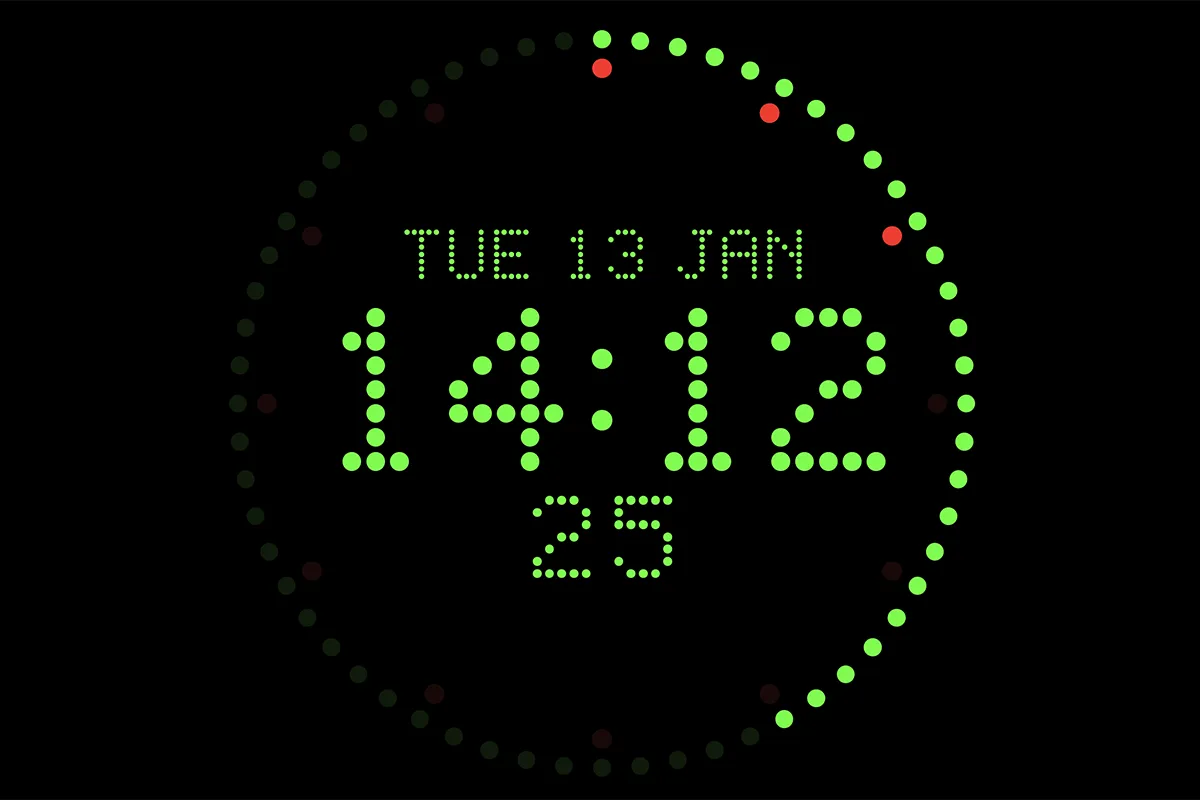
- An outer ring of 60 dots, representing seconds, where at the top of each minute, all dots reset to ‘dim’ and begin illuminating from the 12 o’clock position. A bright green colour is used here
- An inner ring, dimmed at the top of each hour, split into 12 five-minute markers. As each five-minute segment is cleared, the corresponding dot lights in a bright red.
- A date line, with a three-letter day, date number, and three-letter month
- A large time line in 24H format as HH:MM
- A third line with a second count ticking up.
- Display style of dot-matrix / LCD
The build is designed to run full screen in any cut of a web browser supporting JavaScript, with the clock scaling responsively using viewport units. To minimise setup, all scripts, styles and HTML are in the one document, running to 22kb.