
If you’ve been riding on Zwift for any length of time, you’ll know the platform has always been good at making training feel less like a chore.
The virtual worlds, group rides, structured workouts, plans, programmes, even the oddly-satisfying ‘ding’ of levelling up (granted, it used to be much easier), it all helps. Over the past year or so, Zwift has been quietly building something more serious beneath the entertainment layer by introducing genuine fitness-tracking tools.
At the centre of those tools sits a metric called Training Score. So what is it exactly? Where did it come from? And does it actually tell you anything useful, or is it just another number that pops up at the end of a session for you to skip past? Read on, if you please.
Where did Zwift’s Training Score come from?
Zwift’s Training Score arrived as part of a broader Fitness Tracker rollout that kicked off in April 2025, when the platform introduced the ability to sync outdoor rides from Garmin and Wahoo devices for the first time.
The December 2025 update also introduced the Progress Report screen after every session (below) with Training Score big and bold for all to view. More on that here too.
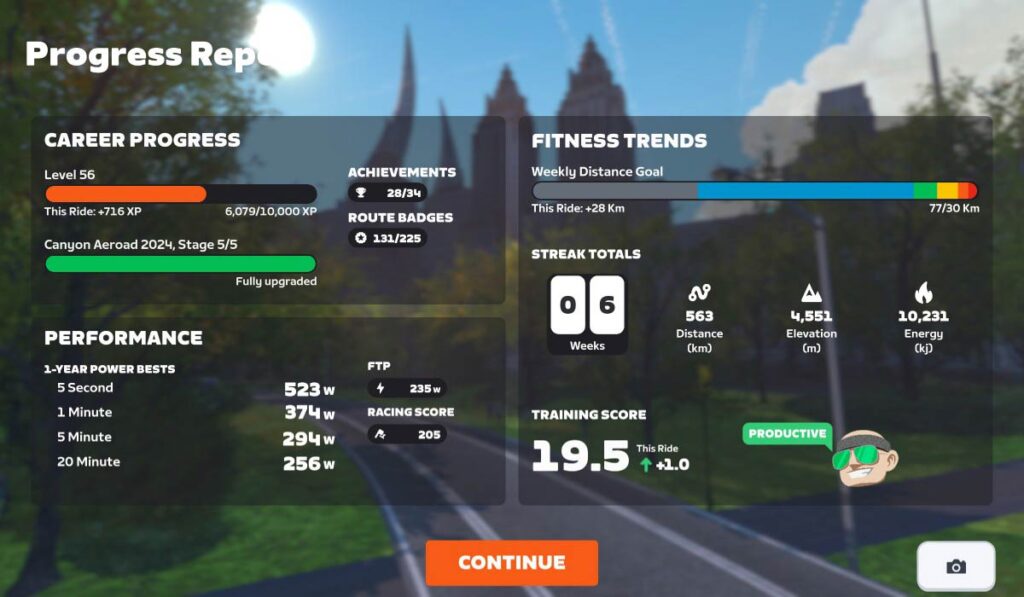
Pre-2025, Zwift was essentially only aware of what you did on the trainer, meaning no visibility of your Wednesday morning road ride or your coffee spin on a Saturday with the club. This made any attempt at tracking overall fitness pretty meaningless.
With outdoor ride syncing now in place (and more recently, running activities too), Zwift’s fitness metrics are designed to help answer common questions from endurance athletes – how am I doing, can I train more, should I train less, what’s my potential?
Training Score is the headline metric within the system, building on well-established sports science rather than inventing anything new.
So what actually is Training Score?
“The training score represents your training load—intensity, duration, and frequency—as a single, easy-to-track score. Your ideal training score will differ depending on your goals and you’ll want to pay attention to your training score and how you’re feeling. If your score is steadily increasing, your status is productive, you’re building fitness, and you’re feeling good, you can be confident you’re progressing well. If you’re starting to feel fatigued or sore or your performance is dropping, you may be overreaching.
Your training score increases as you ride, whether you’re incorporating high-intensity efforts or long endurance rides. A training score of 100 means you’re averaging the equivalent of one hour at FTP every day for 42 days. But if you ride for more than an hour at lower intensities, your score can go even higher because the total training load accounts for both time and effort. Longer rides, even at an easier pace, still add up! As you rest and recover until your next activity, it’s normal for your Training Score to decrease.”
Ultimately, it’s an average of your daily Stress Points (SP), the Zwift equivalent of TSS (Training Stress Score), albeit that your recent sessions count for more than your older sessions.
If you’re unfamiliar with the term, SP is a metric that measures the overall training load and physiological stress of your workout or ride, providing a single, easy-to-understand value representing how much effort and strain you’ve placed on your body. A harder session produces higher SP, an easier session produces lower SP.
If you’re curious, you can also edit the Zwift HUD to include a real-time SP value for your current sessions.
Of course, these are all relative to your FTP so it’s a good idea to make sure that your FTP is correct – says he who’s determined to improve his own FTP over the course of 2026. This piece from Zwift Insider will also help with some more detail, including how your Training Score is calculated.
What else comes with it?
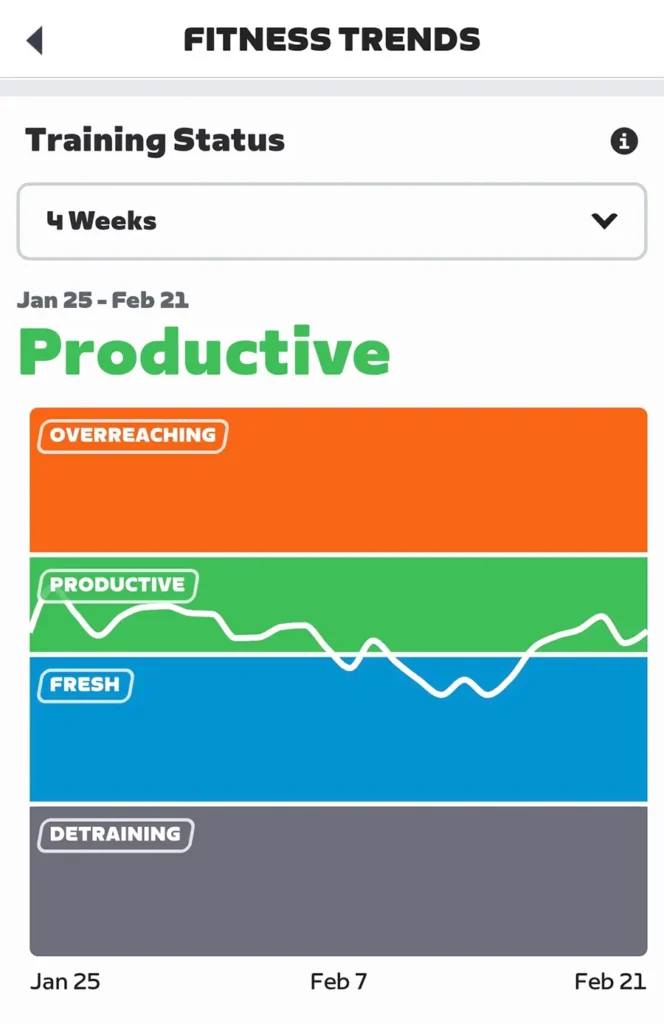
Training Score doesn’t live in isolation. Going back to the April 2025 update, it sits alongside a companion metric called Training Status, which gives you a qualitative label for where you currently are in your training cycle, and you can see this inside the Zwift Companion app too.
From the original news release, “Training Status reflects current training load by comparing long-term fitness (42 days) and short-term fatigue (7 days). Higher training loads build fitness, but it’s vital to balance this with recovery.”
As such, we also get five levels of Training Status
- Ready – Read to start or return to Training
- Fresh – Active and ready for a challenge
- Productive – Consistently training and recovering well (where I’ve found myself for the past six weeks, thankfully)
- Overreaching – Training heavily but in
- Detraining – Loss of fitness due to reduced training
The productive, overreaching and detraining states will be familiar also to anyone wearing anything by Polar on their wrist (I’m still rocking a Polar M2 Vantage (the M3 currently available at around €400, the Pacer a bit more lightweight at €150 – AF)
In coaching terms, the above states are your form or freshness, the gap between your fitness and your fatigue. Again, they’re based purely on numbers you’re putting in through training, there’s no factoring of sleep, external workload, stresses etc. If you’ve been training hard and your fatigue is outpacing your fitness gains, you’ll tip into overreaching territory. Ease off, and you’ll come back through fresh on your way to race-ready legs.
Both metrics are also visible in the Zwift Companion app under Fitness Trends, alongside a chart showing how your Training Score has moved over time.
How useful is it in practice?
Honestly? Quite useful, if you engage with it properly.
The most practical thing that Training Score gives you is a long-term view of your training consistency. You could also use a whiteboard, but you know, this is handy. It’s one thing to feel like you’ve been putting in the work; it’s another to see the number trending over eight or ten weeks. That’s whether you’re hitting a session every day, twice a day, or even two or three times a week.
Consistency is key, and all that jazz.
For those of us training without a coach (maybe 99% of recreational riders), the Training Status labels act as a useful sanity check. If you’re in ‘Productive’ for three or four weeks running, maybe it’s time to take a lighter recovery week, or a ‘deload’ week, as we’ve discussed on the Urban Gym podcast. Your body will thank you.
If you find yourself nudging into ‘Overreaching’, it’s a flag worth heeding rather than ignoring.
But the end, does Training Score actually matter?
Ultimately, it matters if you want it to.
If you’re logging a few sessions a week on Zwift purely for the enjoyment of it – the routes, the social rides, the occasional race – then no, you don’t need to be checking your Training Score every morning. Ride your bike. Have fun. That’s enough.
However, if you have a goal, maybe a sportive you’re building towards, or (like me) you’re working on your endurance and improving your FTP over a certain time, then your Training Score can be a genuinely valuable tool, especially in making sure your training is genuinely progressing rather than just spinning wheels. It turns a solid six weeks of effort into a single number that you can track, question and act on.
The bigger picture for all this, with competition (in a way) from Strava, Whoop, other virtual racing platforms, is that Zwift is continuing to build toward something more ambitious in being ‘the’ platform that tracks your indoor and outdoor riding and running, putting together an accurate picture of how bike-fit, bike-ready you are.
For now, it’s a solid metric that rewards consistency, separate from your general ‘levelling up’, falgs overtraining, and gives you a tangible number to point to when someone asks how your cycling is going. Sometimes that’s all you need, right?
You can read the official line on Zwift Fitness Tracking here.